
Screenshots


App details
- Updated
- August 12, 2013
- Requires
- Windows 2003, Windows 8, Windows Vista,...
- Developer
- PassMark Software
- Category
- Mobile
SoftPas in:
This product is also available in the following languages:
About BurnInTest Standard
Download BurnInTest Standard – hardware diagnostics, system health check, computer stress test, PC reliability, performance testing, benchmarking tool
Overview
BurnInTest Standard is a specialized diagnostic utility designed to assess the stability and performance of computer hardware through rigorous stress testing. The application focuses on evaluating critical subsystems, particularly hard drive functionality, to determine long-term reliability and operational integrity. It serves as a vital tool for users seeking to preemptively identify hardware weaknesses before they lead to system failures. This makes it especially valuable for professionals, IT administrators, and tech enthusiasts who rely on consistent system performance. The software is developed by PassMark Software, a company known for creating performance evaluation tools tailored to technical users. While specific details about the company’s background were not provided, its reputation in the benchmarking and diagnostics space suggests a focus on accuracy and technical depth. Real-world applications include pre-purchase system validation, post-repair verification, and routine maintenance checks. In the broader software ecosystem, BurnInTest Standard fills a niche for reliable, in-depth hardware analysis tools that go beyond basic system monitoring. Its ability to simulate real-world usage under heavy load offers insights that standard diagnostic utilities often lack. The application is not intended for casual users but rather for those with a technical inclination or a need for system assurance.
Key Features & Functionality
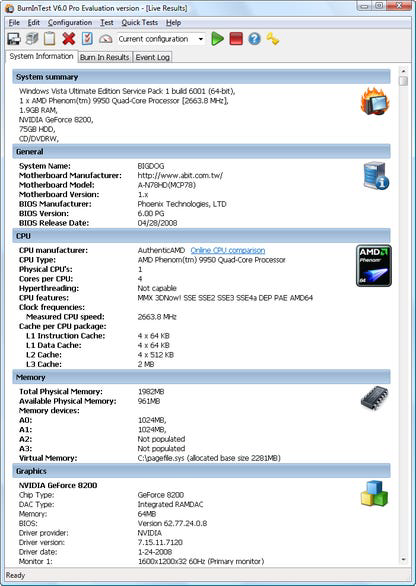
- User-Friendly Interface – Designed with accessibility in mind, the interface presents clear navigation paths and intuitive command buttons. Even users unfamiliar with diagnostic software can manage scan initiation and monitoring without prior training. The layout organizes subsystems into a readable list, allowing users to track which components are being tested.
- Real-Time Progress Monitoring – During testing, a pop-up window displays live updates on each subsystem’s status, offering transparency into the diagnostic process. This feature helps users understand the internal activity of their system and provides confidence in the ongoing evaluation.
- Customizable Testing Parameters – Users can tailor test cycles, select specific subsystems for evaluation, and adjust timing intervals through the Preferences menu. This flexibility supports both targeted diagnostics and comprehensive system overhauls.
- Log Saving and Reporting – After testing completes, users can save detailed logs to file or print them for documentation. These records are useful for tracking system health over time or sharing with technical support teams for troubleshooting.
- Unrestricted 30-Day Trial – A fully functional trial version is available, granting full access to all features without limitations. This allows potential users to evaluate the software’s capabilities in real-world conditions before committing to a purchase.
These features collectively support a workflow where users can initiate a test, monitor progress, customize settings, and retain results for future reference. For example, a technician might use the software to verify a repaired system’s stability, while a home user could run a scan before upgrading components.
Interface, UX & Performance
BurnInTest Standard features a clean, organized interface that prioritizes clarity and functionality. The layout is structured around core diagnostic functions, with visual cues guiding users through each stage of the process. Navigation is straightforward, relying on clearly labeled buttons and a hierarchical display of subsystems. The real-time progress pop-up enhances usability by providing immediate feedback during testing, reducing uncertainty. Although the developer did not list formal performance metrics, the software operates efficiently, with an average scan time of approximately 15 minutes for a full system evaluation. This duration balances thoroughness with practicality. The application remains responsive during testing, allowing users to continue other tasks without significant system lag. Stability appears consistent, though no crash reports or error logs were provided. Performance on different device categories was not disclosed, but the lightweight file size of 20.2 MB suggests minimal resource consumption. The interface adapts well to standard desktop environments, and the absence of visual clutter enhances focus on critical data. While the Help file is noted to be non-functional, the intuitive design reduces dependency on external guidance. Overall, the user experience is smooth and purpose-driven, aligning with the expectations of technical users.
Platform Compatibility & Technical Requirements
BurnInTest Standard is available exclusively for the Windows platform. The current version is 2.1.1, with a file size of 20.2 MB. The developer did not specify minimum OS requirements, nor were details provided about compatibility with specific Windows editions or hardware configurations. As such, users should ensure their system meets general Windows compatibility standards before installation. The application does not appear to require high-end hardware, given its modest size and efficient operation. However, the absence of formal technical specifications means that users should exercise caution when deploying the software on older or non-standard systems. No information was provided regarding updates, automatic sync, or cloud integration. Compatibility with other operating systems was not disclosed, and no details were shared about support for virtual machines or remote testing environments.
Pros and Cons
Pros
- Comprehensive hardware diagnostics with focus on system reliability
- Intuitive interface suitable for users with basic technical knowledge
- Real-time progress tracking during stress tests
- Customizable testing options for targeted diagnostics
- Full access to all features during a 30-day free trial
- Ability to save and export detailed test logs
Cons
- Help file is non-functional, limiting onboarding support
- Specific system requirements were not listed
- Platform limited to Windows only
- No information on automatic updates or cloud features
- Not designed for non-technical users
FAQ
Is BurnInTest Standard safe to use on my computer?
Yes, the software is designed to stress-test hardware components in a controlled manner. It simulates heavy workloads to assess stability, but does not cause permanent damage when used as intended.
Can I use BurnInTest Standard on older Windows systems?
The developer did not specify minimum OS requirements. Users are advised to ensure their system meets standard Windows compatibility standards before installation.
Is there a free version of BurnInTest Standard?
Yes, a fully functional 30-day trial is available with no feature restrictions. After the trial, a purchase is required to continue using the software.
Does BurnInTest Standard support macOS or Linux?
Based on available information, the application is only available for Windows. No versions for macOS or Linux were mentioned.
How long does a typical diagnostic test take?
On average, a full system scan takes about 15 minutes. The duration may vary depending on the selected subsystems and system configuration.
Final Thoughts
BurnInTest Standard stands out as a dependable tool for users who require in-depth hardware validation and long-term system reliability checks. Its combination of a user-friendly interface, customizable testing, and comprehensive reporting makes it a strong choice for IT professionals, system builders, and tech-savvy individuals. While the non-functional Help file is a notable drawback, the software’s intuitive design largely compensates for this limitation. The 30-day trial offers ample opportunity to assess its value without risk. For those prioritizing system stability and performance, BurnInTest Standard delivers a focused, efficient diagnostic experience. Its lightweight footprint and targeted functionality ensure it remains a relevant utility in the technical toolkit. Whether used for pre-upgrade verification or post-repair validation, the software provides actionable insights into hardware health. Download BurnInTest Standard now.
Guides & Tutorials
How to install BurnInTest Standard
- Click the Download button above.
- Once redirected, accept the terms and click Install.
- Wait for the BurnInTest Standard download to finish on your device.
How to use BurnInTest Standard
This software is primarily used for its core features described above. Open the app after installation to explore its capabilities.
User Reviews
No reviews yet. Be the first to share your experience.
You may also like
more
Que no te pillen¡
About !Que no te pillen¡Reviewed by Jason A. BilbreyShow MoreShow Less

3D Combat Zone
About 3D Combat ZoneOriginally released in 1983, 3D Combat Zone immerses players...

666: El día del portal
About 666: El día del portalOn June 6, 2006, Agent P. Stone uncovers a sinister...

80 in 1 Best Flash games
About 80 in 1 Best Flash games 80 in 1 Best Flash games is a collection of 80 fl...

ABYSS SEEKERーーWhat Do You See Deep in The Abyss
About ABYSS SEEKERーーWhat Do You See Deep in The AbyssIn ABYSS SEEKER, players...

ACA NEOGEO THE KING OF FIGHTERS 2002 for Windows
About ACA NEOGEO THE KING OF FIGHTERS 2002 for WindowsTHE KING OF FIGHTERS 2002,...